



Latest Version
Version
Latest
Latest
Update
June 18, 2026
June 18, 2026
Developer
TMZ Visionary
TMZ Visionary
Categories
Platforms
Android
Android
Downloads
0
0
License
$0.49
$0.49
Package Name
com.tmzvisionary.Digital_3365
com.tmzvisionary.Digital_3365
Report
Report a Problem
Report a Problem
More About Watch Face Neon Health TMZ
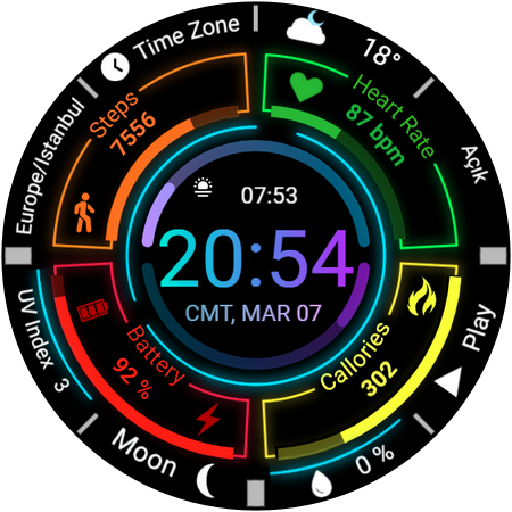
Enhance your Wear OS experience with this modern, neon-styled digital watch face. Designed for those who love a futuristic dashboard look (HUD) and want all their vital health data at a glance.
This watch face features a vibrant, quad-sector layout that organizes your information perfectly, making it easy to read in any lighting condition. Perfect for sports, fitness activities, and daily use.
✨ MAIN FEATURES:
• Modern Digital Time: Large, legible font (12h/24h format based on phone settings).
• Comprehensive Health Data:
- Heart Rate Monitor (BPM) with visual indicator.
- Step Counter with progress bar.
- Calorie Burn Tracker.
• Battery Status: Clear percentage display with color-coded bar.
• Detailed Complications:
- Weather Info (Temp & Conditions).
- UV Index display.
- Moon Phase indicator.
- Date & Day display.
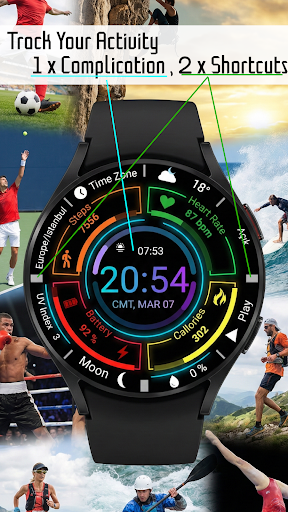
• Shortcuts: Quick access to essential apps (Music/Play, Alarm, Calendar).
• Always On Display (AOD): Battery-efficient mode that keeps key info visible.
• High Contrast Design: Neon colors on a deep black background for battery saving and style.
🎨 CUSTOMIZATION:
You can customize the complications to show the data that matters most to you (Weather, Barometer, Sunset/Sunrise, etc.) depending on your watch model.
📱 COMPATIBILITY:
This watch face is designed for Wear OS devices API Level 30+ (Wear OS 3.0 and above).
Compatible with: Samsung Galaxy Watch 4, 5, 6, 7, Ultra, Pixel Watch, and other Wear OS smartwatches.
---------------------------------------------------------
INSTALLATION NOTES:
1. Ensure the watch is properly connected to the phone via Bluetooth.
2. Install the app on your phone and tap on "Install on Watch".
3. Check your watch notification or play store on the watch to initiate installation.
4. If you face payment loop issues, try installing directly from the Play Store on the watch or use a web browser on a PC/Laptop.
---------------------------------------------------------
Developer: TMZ Visionary
Enjoy your new watch face!
This watch face features a vibrant, quad-sector layout that organizes your information perfectly, making it easy to read in any lighting condition. Perfect for sports, fitness activities, and daily use.
✨ MAIN FEATURES:
• Modern Digital Time: Large, legible font (12h/24h format based on phone settings).
• Comprehensive Health Data:
- Heart Rate Monitor (BPM) with visual indicator.
- Step Counter with progress bar.
- Calorie Burn Tracker.
• Battery Status: Clear percentage display with color-coded bar.
• Detailed Complications:
- Weather Info (Temp & Conditions).
- UV Index display.
- Moon Phase indicator.
- Date & Day display.
• Shortcuts: Quick access to essential apps (Music/Play, Alarm, Calendar).
• Always On Display (AOD): Battery-efficient mode that keeps key info visible.
• High Contrast Design: Neon colors on a deep black background for battery saving and style.
🎨 CUSTOMIZATION:
You can customize the complications to show the data that matters most to you (Weather, Barometer, Sunset/Sunrise, etc.) depending on your watch model.
📱 COMPATIBILITY:
This watch face is designed for Wear OS devices API Level 30+ (Wear OS 3.0 and above).
Compatible with: Samsung Galaxy Watch 4, 5, 6, 7, Ultra, Pixel Watch, and other Wear OS smartwatches.
---------------------------------------------------------
INSTALLATION NOTES:
1. Ensure the watch is properly connected to the phone via Bluetooth.
2. Install the app on your phone and tap on "Install on Watch".
3. Check your watch notification or play store on the watch to initiate installation.
4. If you face payment loop issues, try installing directly from the Play Store on the watch or use a web browser on a PC/Laptop.
---------------------------------------------------------
Developer: TMZ Visionary
Enjoy your new watch face!
Rate the App
Add Comment & Review
User Reviews
Based on 0 reviews
No reviews added yet.
Comments will not be approved to be posted if they are SPAM, abusive, off-topic, use profanity, contain a personal attack, or promote hate of any kind.
More »

Popular Apps

Dawn of Zombies: Survival GameRoyal Ark

Network Data SubIsah

Tank Force: War games of BlitzXDEVS LTD

Grim Soul: Dark Survival RPGBrickworks Games Ltd

Kaspersky: VPN & AntivirusKaspersky ME

WhatsApp MessengerWhatsApp LLC

NordVPN – fast VPN for privacyNord Security

Kaspersky Fast Secure VPNKaspersky ME

Call of Duty Mobile Season 8Activision Publishing, Inc.

Vikings: War of ClansPlarium LLC
More »
Editor's Choice
Grim Soul: Dark Survival RPGBrickworks Games Ltd

Craft of Survival - Gladiators101XP LIMITED

Last Shelter: SurvivalLong Tech Network Limited
Dawn of Zombies: Survival GameRoyal Ark

Merge Survival : WastelandStickyHands Inc.

AoD Vikings: Valhalla GameRoboBot Studio

Viking Clan: RagnarokKano Games
Vikings: War of ClansPlarium LLC

Asphalt 9: LegendsGameloft SE

Modern Tanks: War Tank GamesXDEVS LTD