




Latest Version
Version
Latest
Latest
Update
August 22, 2026
August 22, 2026
Developer
Scada SIA
Scada SIA
Categories
Platforms
Android
Android
Downloads
0
0
License
Free
Free
Package Name
so.tweek.android
so.tweek.android
Report
Report a Problem
Report a Problem
More About Tweek: Weekly Planner & To Do
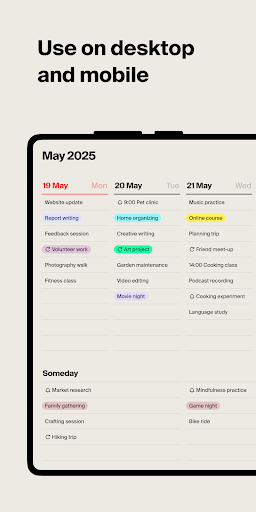
Tweek is a minimal weekly planner and to-do list with a clean, paper-like design. Organize your tasks, set reminders, two-way sync your Google and Outlook calendars, and collaborate with your team or family.
It looks simple at first glance, but it packs a punch. Tweek is built around a focused weekly view, with no overwhelming clutter and no stressful hourly grid, so you can plan your week and organize your life and work at a glance.
— Month, Week & Day Views
Start with the weekly view, switch to a month for the big picture, or zoom into a single day to stay on track.
—Two-Way Sync: Google & Outlook Calendars
Connect Google Calendar or Outlook and every event stays up to date in both places, automatically.
— Tasks, Notes, Files & Subtasks
Add notes, attach files and images, and split big tasks into subtasks. Color-code everything and share any task via link, even with people outside Tweek.
— Reminders
Set reminders for any task and get notified by push, email, or both. You'll always know when it's time.
— Recurring Tasks
Set it once and let it roll, with recurring tasks on a daily, weekly, monthly, yearly, or fully custom schedule.
— Auto Roll-Over
Check things off and keep it tidy. Anything left undone automatically moves to tomorrow. No task left behind.
— Fast Search & Color Tags
Swipe to search through your tasks in seconds and filter by color tags to find exactly what you need.
— Themes & Color Palette
Make Tweek yours with theme presets, from clean white like paper to cool blue or extra minimal, plus a full color palette with custom sets.
— Real-Time Collaboration
Share a calendar and work together in real time, or publish your weekly planner to the web. Easy to share, no sign-up required to view.
— Multiple Calendars
Create as many calendars as you need, whether personal, work, or family, and share each one or keep it private.
— Synced Across Your Devices
Your calendar stays in sync everywhere, across phone, tablet, desktop, and web, so you're organized wherever you go.
Whether you need a personal to-do list, a shared family calendar, or a weekly planner for your team, Tweek keeps planning simple, focused, and beautiful.
Questions or ideas? Feel free to drop us a line at hello@tweek.so
X: @tweekHQ
Threads: @tweek.so
www.tweek.so
It looks simple at first glance, but it packs a punch. Tweek is built around a focused weekly view, with no overwhelming clutter and no stressful hourly grid, so you can plan your week and organize your life and work at a glance.
— Month, Week & Day Views
Start with the weekly view, switch to a month for the big picture, or zoom into a single day to stay on track.
—Two-Way Sync: Google & Outlook Calendars
Connect Google Calendar or Outlook and every event stays up to date in both places, automatically.
— Tasks, Notes, Files & Subtasks
Add notes, attach files and images, and split big tasks into subtasks. Color-code everything and share any task via link, even with people outside Tweek.
— Reminders
Set reminders for any task and get notified by push, email, or both. You'll always know when it's time.
— Recurring Tasks
Set it once and let it roll, with recurring tasks on a daily, weekly, monthly, yearly, or fully custom schedule.
— Auto Roll-Over
Check things off and keep it tidy. Anything left undone automatically moves to tomorrow. No task left behind.
— Fast Search & Color Tags
Swipe to search through your tasks in seconds and filter by color tags to find exactly what you need.
— Themes & Color Palette
Make Tweek yours with theme presets, from clean white like paper to cool blue or extra minimal, plus a full color palette with custom sets.
— Real-Time Collaboration
Share a calendar and work together in real time, or publish your weekly planner to the web. Easy to share, no sign-up required to view.
— Multiple Calendars
Create as many calendars as you need, whether personal, work, or family, and share each one or keep it private.
— Synced Across Your Devices
Your calendar stays in sync everywhere, across phone, tablet, desktop, and web, so you're organized wherever you go.
Whether you need a personal to-do list, a shared family calendar, or a weekly planner for your team, Tweek keeps planning simple, focused, and beautiful.
Questions or ideas? Feel free to drop us a line at hello@tweek.so
X: @tweekHQ
Threads: @tweek.so
www.tweek.so
Rate the App
Add Comment & Review
User Reviews
Based on 0 reviews
No reviews added yet.
Comments will not be approved to be posted if they are SPAM, abusive, off-topic, use profanity, contain a personal attack, or promote hate of any kind.
More »

Popular Apps

AI Voice Chat Bot: Open Wisdom 4.62TarrySoft

Dawn of Zombies: Survival GameRoyal Ark

Network Data SubIsah

Tank Force: War games of BlitzXDEVS LTD

WhatsApp MessengerWhatsApp LLC

Grim Soul: Dark Survival RPGBrickworks Games Ltd

Kaspersky: VPN & AntivirusKaspersky ME

NordVPN – fast VPN for privacyNord Security

Call of Duty Mobile Season 8Activision Publishing, Inc.

Vikings: War of ClansPlarium LLC
More »
Editor's Choice
Grim Soul: Dark Survival RPGBrickworks Games Ltd

Craft of Survival - Gladiators101XP LIMITED

Last Shelter: SurvivalLong Tech Network Limited
Dawn of Zombies: Survival GameRoyal Ark

Merge Survival : WastelandStickyHands Inc.

AoD Vikings: Valhalla GameRoboBot Studio

Viking Clan: RagnarokKano Games
Vikings: War of ClansPlarium LLC

Asphalt 9: LegendsGameloft SE

Modern Tanks: War Tank GamesXDEVS LTD