




Latest Version
Version
Latest
Latest
Update
June 23, 2026
June 23, 2026
Developer
T’way Air Co., Ltd.
T’way Air Co., Ltd.
Categories
Platforms
Android
Android
Downloads
0
0
License
Free
Free
Package Name
com.twayair.m.app
com.twayair.m.app
Report
Report a Problem
Report a Problem
More About T'way Air
T’way Air is a proud national airline of the Republic of Korea.
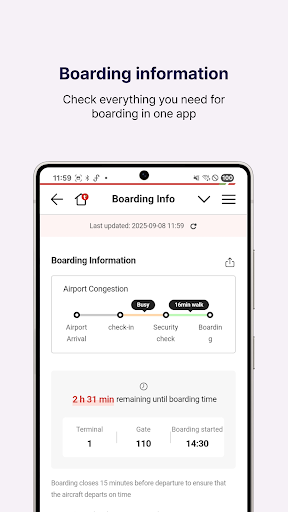
1. Faster Ticket Booking, Payment, and Reservation Management
• Flight booking, reservation, and payment
• Manage flight reservations
• Check-in service for both domestic and international flights
2. Easy and Convenient Simple Payment
Supports Naver Pay, Kakao Pay, WeChat, Toss, PayPal, UnionPay, and Alipay.
3. Wide Range of Ancillary Services (Up to 40% off with online pre-purchase)
• Advance Seat Selection: Choose your preferred window seat or a more comfortable seat for a pleasant journey.
• In-flight Meal Pre-order: Enjoy a variety of meals prepared by T’way through advance reservation.
• Checked Baggage: Travel light by checking in your heavy luggage.
• Ancillary Service Bundles: Save more by purchasing bundles (extra baggage, advance seat selection, and in-flight meal pre-order) compared to buying each service separately.
4. Lowest Fare Search at a Glance
Check the lowest fares for your desired routes using the Low Fare Calendar.
5. Multi-currency and Multi-language Support
• Supports 14 currencies: KRW, USD, CAD, JPY, CNY, TWD, THB, VND, EUR, MOP, HKD, MYR, AUD, IDR
• Available in 7 languages: Korean, English, Japanese, Simplified Chinese, Traditional Chinese, Thai, Vietnamese
________________________________________
[Optional Access Permissions]
• Camera Access: Passport recognition
• Notifications: Receive PUSH notifications for service and marketing
information
• Media and files Permission (for Android OS 9 or earlier): Save files and boarding passes in the app, and attach photos when submitting inquiries.
※ Optional access permissions are required when using the relevant features. If not granted, you can still use services other than those features. Optional access permissions can be withdrawn via [Settings] – [Applications] – [T’way Air] – [Permissions].
To use the T’way Air application, we recommend updating to the latest version. The app supports Android 9.0 or higher.
1. Faster Ticket Booking, Payment, and Reservation Management
• Flight booking, reservation, and payment
• Manage flight reservations
• Check-in service for both domestic and international flights
2. Easy and Convenient Simple Payment
Supports Naver Pay, Kakao Pay, WeChat, Toss, PayPal, UnionPay, and Alipay.
3. Wide Range of Ancillary Services (Up to 40% off with online pre-purchase)
• Advance Seat Selection: Choose your preferred window seat or a more comfortable seat for a pleasant journey.
• In-flight Meal Pre-order: Enjoy a variety of meals prepared by T’way through advance reservation.
• Checked Baggage: Travel light by checking in your heavy luggage.
• Ancillary Service Bundles: Save more by purchasing bundles (extra baggage, advance seat selection, and in-flight meal pre-order) compared to buying each service separately.
4. Lowest Fare Search at a Glance
Check the lowest fares for your desired routes using the Low Fare Calendar.
5. Multi-currency and Multi-language Support
• Supports 14 currencies: KRW, USD, CAD, JPY, CNY, TWD, THB, VND, EUR, MOP, HKD, MYR, AUD, IDR
• Available in 7 languages: Korean, English, Japanese, Simplified Chinese, Traditional Chinese, Thai, Vietnamese
________________________________________
[Optional Access Permissions]
• Camera Access: Passport recognition
• Notifications: Receive PUSH notifications for service and marketing
information
• Media and files Permission (for Android OS 9 or earlier): Save files and boarding passes in the app, and attach photos when submitting inquiries.
※ Optional access permissions are required when using the relevant features. If not granted, you can still use services other than those features. Optional access permissions can be withdrawn via [Settings] – [Applications] – [T’way Air] – [Permissions].
To use the T’way Air application, we recommend updating to the latest version. The app supports Android 9.0 or higher.
Rate the App
Add Comment & Review
User Reviews
Based on 0 reviews
No reviews added yet.
Comments will not be approved to be posted if they are SPAM, abusive, off-topic, use profanity, contain a personal attack, or promote hate of any kind.
More »

Popular Apps

Dawn of Zombies: Survival GameRoyal Ark

Network Data SubIsah

Tank Force: War games of BlitzXDEVS LTD

Grim Soul: Dark Survival RPGBrickworks Games Ltd

WhatsApp MessengerWhatsApp LLC

Kaspersky: VPN & AntivirusKaspersky ME

NordVPN – fast VPN for privacyNord Security

Kaspersky Fast Secure VPNKaspersky ME

Vikings: War of ClansPlarium LLC

Turbo VPN - Secure VPN ProxyInnovative Connecting
More »
Editor's Choice
Grim Soul: Dark Survival RPGBrickworks Games Ltd

Craft of Survival - Gladiators101XP LIMITED

Last Shelter: SurvivalLong Tech Network Limited
Dawn of Zombies: Survival GameRoyal Ark

Merge Survival : WastelandStickyHands Inc.

AoD Vikings: Valhalla GameRoboBot Studio

Viking Clan: RagnarokKano Games
Vikings: War of ClansPlarium LLC

Asphalt 9: LegendsGameloft SE

Modern Tanks: War Tank GamesXDEVS LTD