


Latest Version
Version
Latest
Latest
Update
June 22, 2026
June 22, 2026
Developer
PERSONA Watch Face
PERSONA Watch Face
Categories
Platforms
Android
Android
Downloads
0
0
License
$2.99
$2.99
Package Name
com.watchfacestudio.per008_soho
com.watchfacestudio.per008_soho
Report
Report a Problem
Report a Problem
More About PER8 Digital Watch Face
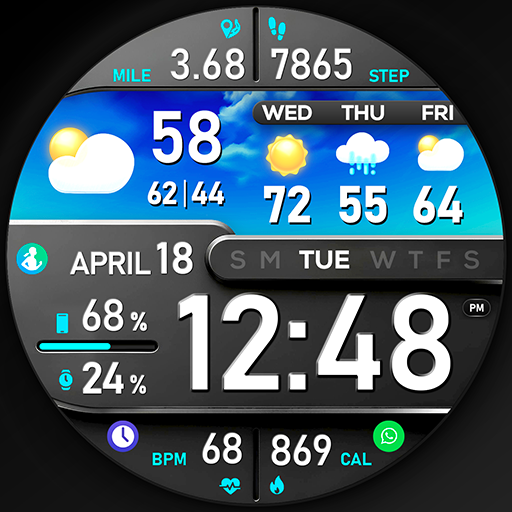
🚀 PER8 Digital Watch Face is an advanced digital watch face designed for Wear OS smartwatches, offering changeable font styles, dynamic day & night visuals, stunning visuals, and forecast weather data.
Dynamic Day & Night Visuals
🌞 Day Mode: Calm and peaceful sky animation.
🌌 Night Mode: Stunning northern lights animation.
🎨 Customize your PER8 Weather WatchFace
10 font styles for time
10 backgrounds
20 color combinations
Closable/stoppable sky animation
Sky animation for the day display
Northern lights animation for the night display
8 custom complications
3 custom shortcuts
10 AOD Dims
🔹 Key Features of PER8 Weather WatchFace Digital
Weather type and temperature (°F / °C)
High & Low temperature (°F / °C)
Next 3 days' weather type
Next 3 days' temperature (°F / °C)
Steps, daily goal & distance (KM / Miles)
Phone & watch battery level
Active burned calories, floors
Heart rate monitor
UV index, rain possibility
Moon phase, sunset/sunrise
Time zone, barometer
Next appointment reminder
Always-On display with adjustable colors
🛠️ Easy Customization Mode
Simply touch and hold to personalize what data you see — weather, sunrise/sunset, time zone, and more.
🔋 For extra complications and widgets like phone battery, calories, or floors, please check the setup guide here:
👉 https://persona-wf.com/installation/
⚡ Phone Battery Level
You’ll need to install a companion app on both your phone and watch:
Phone Battery Complication
https://play.google.com/store/apps/details?id=com.weartools.phonebattcomp
❓ Troubleshooting Weather Information
This is usually related to how the watch fetches weather data.
Please follow these steps:
1- Install “Simple Weather” on both phone and watch
https://play.google.com/store/apps/details?id=com.thewizrd.simpleweather
2- Set its update interval to 1 hour
3- Wait a few minutes for data to sync
If it still continues, please send me an email.
🌙 Always-On Display (AOD)
The watch face has an always-active display. You can change the brightness level in the customization menu. There are 10 levels in total.
The colors are synchronized with the normal view.
With the new option “AOD Dim” in the customization menu, you can now change the AOD layout.
🌐 More Details:
https://persona-wf.com/portfolios/soho/
📖 Installation Guide
Before leaving a review, make sure to check the installation guide and FAQ for a smooth experience:
👉 https://persona-wf.com/installation/
⌚ Supported Devices
Compatible with all Wear OS devices (API Level 34+), including:
SAMSUNG: Galaxy Watch8 Classic, Galaxy Watch Ultra, Watch8, 7, 6, 5, 4
GOOGLE: Pixel Watch 1, 2, 3, 4
FOSSIL: Gen 7, Gen 6, Gen 5e series
MOBVOI: TicWatch Pro 5, Pro 3, E3, C2
🚀 Exceptional Support
Need assistance? We’re here for you
📩 support@persona-wf.com
💜 Join Our Community
Get the latest designs & exclusive offers
🌐 https://persona-wf.com
📩 Newsletter
https://persona-wf.com/register
👍 Facebook
https://www.facebook.com/Persona-Watch-Face
📸 Instagram
https://www.instagram.com/persona_watch_face
💬 Telegram
https://t.me/persona_watchface
▶️ YouTube
https://www.youtube.com/c/PersonaWatchFace
💖💖💖 Thank You for Choosing PERSONA!
We hope our design brightens your day and your wrist 😊
Designed with love by Ayla GOKMEN
Dynamic Day & Night Visuals
🌞 Day Mode: Calm and peaceful sky animation.
🌌 Night Mode: Stunning northern lights animation.
🎨 Customize your PER8 Weather WatchFace
10 font styles for time
10 backgrounds
20 color combinations
Closable/stoppable sky animation
Sky animation for the day display
Northern lights animation for the night display
8 custom complications
3 custom shortcuts
10 AOD Dims
🔹 Key Features of PER8 Weather WatchFace Digital
Weather type and temperature (°F / °C)
High & Low temperature (°F / °C)
Next 3 days' weather type
Next 3 days' temperature (°F / °C)
Steps, daily goal & distance (KM / Miles)
Phone & watch battery level
Active burned calories, floors
Heart rate monitor
UV index, rain possibility
Moon phase, sunset/sunrise
Time zone, barometer
Next appointment reminder
Always-On display with adjustable colors
🛠️ Easy Customization Mode
Simply touch and hold to personalize what data you see — weather, sunrise/sunset, time zone, and more.
🔋 For extra complications and widgets like phone battery, calories, or floors, please check the setup guide here:
👉 https://persona-wf.com/installation/
⚡ Phone Battery Level
You’ll need to install a companion app on both your phone and watch:
Phone Battery Complication
https://play.google.com/store/apps/details?id=com.weartools.phonebattcomp
❓ Troubleshooting Weather Information
This is usually related to how the watch fetches weather data.
Please follow these steps:
1- Install “Simple Weather” on both phone and watch
https://play.google.com/store/apps/details?id=com.thewizrd.simpleweather
2- Set its update interval to 1 hour
3- Wait a few minutes for data to sync
If it still continues, please send me an email.
🌙 Always-On Display (AOD)
The watch face has an always-active display. You can change the brightness level in the customization menu. There are 10 levels in total.
The colors are synchronized with the normal view.
With the new option “AOD Dim” in the customization menu, you can now change the AOD layout.
🌐 More Details:
https://persona-wf.com/portfolios/soho/
📖 Installation Guide
Before leaving a review, make sure to check the installation guide and FAQ for a smooth experience:
👉 https://persona-wf.com/installation/
⌚ Supported Devices
Compatible with all Wear OS devices (API Level 34+), including:
SAMSUNG: Galaxy Watch8 Classic, Galaxy Watch Ultra, Watch8, 7, 6, 5, 4
GOOGLE: Pixel Watch 1, 2, 3, 4
FOSSIL: Gen 7, Gen 6, Gen 5e series
MOBVOI: TicWatch Pro 5, Pro 3, E3, C2
🚀 Exceptional Support
Need assistance? We’re here for you
📩 support@persona-wf.com
💜 Join Our Community
Get the latest designs & exclusive offers
🌐 https://persona-wf.com
📩 Newsletter
https://persona-wf.com/register
https://www.facebook.com/Persona-Watch-Face
https://www.instagram.com/persona_watch_face
💬 Telegram
https://t.me/persona_watchface
▶️ YouTube
https://www.youtube.com/c/PersonaWatchFace
💖💖💖 Thank You for Choosing PERSONA!
We hope our design brightens your day and your wrist 😊
Designed with love by Ayla GOKMEN
Rate the App
Add Comment & Review
User Reviews
Based on 0 reviews
No reviews added yet.
Comments will not be approved to be posted if they are SPAM, abusive, off-topic, use profanity, contain a personal attack, or promote hate of any kind.
More »

Popular Apps

Dawn of Zombies: Survival GameRoyal Ark

Network Data SubIsah

Tank Force: War games of BlitzXDEVS LTD

Grim Soul: Dark Survival RPGBrickworks Games Ltd

WhatsApp MessengerWhatsApp LLC

Kaspersky: VPN & AntivirusKaspersky ME

NordVPN – fast VPN for privacyNord Security

Kaspersky Fast Secure VPNKaspersky ME

Vikings: War of ClansPlarium LLC

Turbo VPN - Secure VPN ProxyInnovative Connecting
More »
Editor's Choice
Grim Soul: Dark Survival RPGBrickworks Games Ltd

Craft of Survival - Gladiators101XP LIMITED

Last Shelter: SurvivalLong Tech Network Limited
Dawn of Zombies: Survival GameRoyal Ark

Merge Survival : WastelandStickyHands Inc.

AoD Vikings: Valhalla GameRoboBot Studio

Viking Clan: RagnarokKano Games
Vikings: War of ClansPlarium LLC

Asphalt 9: LegendsGameloft SE

Modern Tanks: War Tank GamesXDEVS LTD