




Latest Version
Version
Latest
Latest
Update
June 22, 2026
June 22, 2026
Developer
Matteo Dini MD ® Watch Faces
Matteo Dini MD ® Watch Faces
Categories
Platforms
Android
Android
Downloads
0
0
License
$2.49
$2.49
Package Name
com.watchfacestudio.md336
com.watchfacestudio.md336
Report
Report a Problem
Report a Problem
More About MD336 Digital watch face
New Watch Face Format.
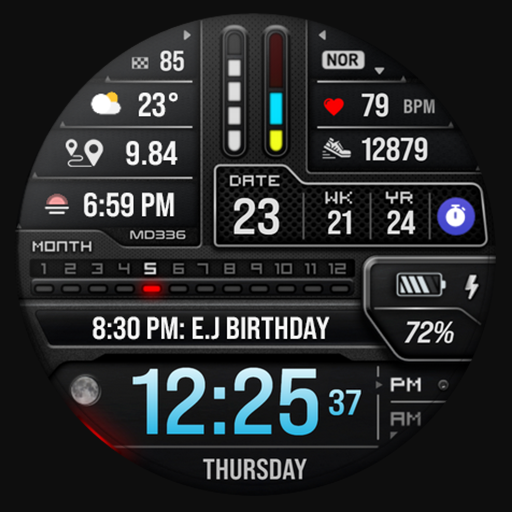
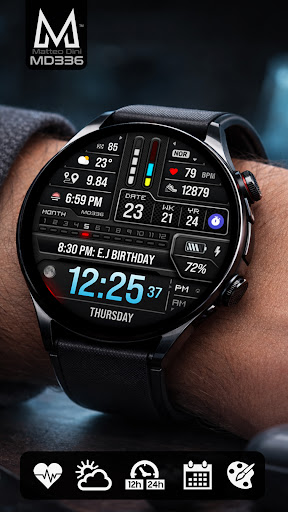
Designed with the latest Watch Face Format required by Google Play, this premium digital watch face combines a modern futuristic dashboard with advanced customization, health data integration, and elegant LCD-inspired visuals.
Key Features:
- Premium futuristic digital dashboard design
- 4 Preset App Shortcuts + 1 Customizable Shortcut
- 4 Customizable Complications
- Full color customization
- Customizable LCD and UI colors
- Minimal & Full Always On Display modes
- Moon Phase
- Week of Year
Compatibility:
Supports all Wear OS devices with API Level 33+ (Wear OS 4 and later), including Samsung Galaxy Watch 4-8, Ultra, Pixel Watch and other Wear OS smartwatches.
Features at a Glance:
- 12/24hr Format (syncs with phone settings)
- Date
- Day
- Month
- Year
- Week of Year
- Moon Phase
- Heart Rate Monitoring + Intervals
- Steps + Daily Goals
- Battery Meter
Included App Shortcuts:
- Calendar
- Battery
- Heart Rate
- Alarm
Customization:
1. Touch and hold the display on your watch.
2. Tap “Customize”.
Customize independently:
- Time colors
- Date colors
- LCD colors
- UI colors
- Seconds colors
- Goal bars colors
- Heart interval colors
Complications:
Customize up to 4 complications with data such as:
- Weather
- Distance walked
- Calories burned
- UV index
- Chance of rain
- Barometer
- World clock
- And more
Some complication providers may require additional third-party apps installed on your watch.
Important Notes:
The Samsung Wearable app may occasionally fail to load complex watch faces during customization. This is a known Samsung companion app limitation and not a problem with the watch face itself.
For the best experience, customize the watch face directly on your watch:
Touch & Hold Screen → Customize
Installation & Troubleshooting:
https://www.matteodinimd.com/watchface-installation/
Support:
For support or installation help:
support@mdwatchfaces.com
Some features may not be available on all devices.
Stay Connected:
Newsletter:
http://eepurl.com/hlRcvf
FACEBOOK:
https://www.facebook.com/matteodiniwatchfaces
INSTAGRAM:
https://www.instagram.com/mdwatchfaces/
TELEGRAM:
https://t.me/mdwatchfaces
WEB:
https://www.matteodinimd.com
Thank you for supporting MD Watch Faces!
Designed with the latest Watch Face Format required by Google Play, this premium digital watch face combines a modern futuristic dashboard with advanced customization, health data integration, and elegant LCD-inspired visuals.
Key Features:
- Premium futuristic digital dashboard design
- 4 Preset App Shortcuts + 1 Customizable Shortcut
- 4 Customizable Complications
- Full color customization
- Customizable LCD and UI colors
- Minimal & Full Always On Display modes
- Moon Phase
- Week of Year
Compatibility:
Supports all Wear OS devices with API Level 33+ (Wear OS 4 and later), including Samsung Galaxy Watch 4-8, Ultra, Pixel Watch and other Wear OS smartwatches.
Features at a Glance:
- 12/24hr Format (syncs with phone settings)
- Date
- Day
- Month
- Year
- Week of Year
- Moon Phase
- Heart Rate Monitoring + Intervals
- Steps + Daily Goals
- Battery Meter
Included App Shortcuts:
- Calendar
- Battery
- Heart Rate
- Alarm
Customization:
1. Touch and hold the display on your watch.
2. Tap “Customize”.
Customize independently:
- Time colors
- Date colors
- LCD colors
- UI colors
- Seconds colors
- Goal bars colors
- Heart interval colors
Complications:
Customize up to 4 complications with data such as:
- Weather
- Distance walked
- Calories burned
- UV index
- Chance of rain
- Barometer
- World clock
- And more
Some complication providers may require additional third-party apps installed on your watch.
Important Notes:
The Samsung Wearable app may occasionally fail to load complex watch faces during customization. This is a known Samsung companion app limitation and not a problem with the watch face itself.
For the best experience, customize the watch face directly on your watch:
Touch & Hold Screen → Customize
Installation & Troubleshooting:
https://www.matteodinimd.com/watchface-installation/
Support:
For support or installation help:
support@mdwatchfaces.com
Some features may not be available on all devices.
Stay Connected:
Newsletter:
http://eepurl.com/hlRcvf
FACEBOOK:
https://www.facebook.com/matteodiniwatchfaces
INSTAGRAM:
https://www.instagram.com/mdwatchfaces/
TELEGRAM:
https://t.me/mdwatchfaces
WEB:
https://www.matteodinimd.com
Thank you for supporting MD Watch Faces!
Rate the App
Add Comment & Review
User Reviews
Based on 0 reviews
No reviews added yet.
Comments will not be approved to be posted if they are SPAM, abusive, off-topic, use profanity, contain a personal attack, or promote hate of any kind.
More »

Popular Apps

Dawn of Zombies: Survival GameRoyal Ark

Network Data SubIsah

Tank Force: War games of BlitzXDEVS LTD

Grim Soul: Dark Survival RPGBrickworks Games Ltd

WhatsApp MessengerWhatsApp LLC

Kaspersky: VPN & AntivirusKaspersky ME

NordVPN – fast VPN for privacyNord Security

Kaspersky Fast Secure VPNKaspersky ME

Vikings: War of ClansPlarium LLC

Turbo VPN - Secure VPN ProxyInnovative Connecting
More »
Editor's Choice
Grim Soul: Dark Survival RPGBrickworks Games Ltd

Craft of Survival - Gladiators101XP LIMITED

Last Shelter: SurvivalLong Tech Network Limited
Dawn of Zombies: Survival GameRoyal Ark

Merge Survival : WastelandStickyHands Inc.

AoD Vikings: Valhalla GameRoboBot Studio

Viking Clan: RagnarokKano Games
Vikings: War of ClansPlarium LLC

Asphalt 9: LegendsGameloft SE

Modern Tanks: War Tank GamesXDEVS LTD