


Latest Version
Version
Latest
Latest
Update
June 17, 2026
June 17, 2026
Developer
Filmmotion Studio
Filmmotion Studio
Categories
Platforms
Android
Android
Downloads
0
0
License
Free
Free
Package Name
com.magic.fluidwallpaper.magicfluids.livefluid.fluidwallpaper.watchface.wear
com.magic.fluidwallpaper.magicfluids.livefluid.fluidwallpaper.watchface.wear
Report
Report a Problem
Report a Problem
More About Magic Fluids Watch Face
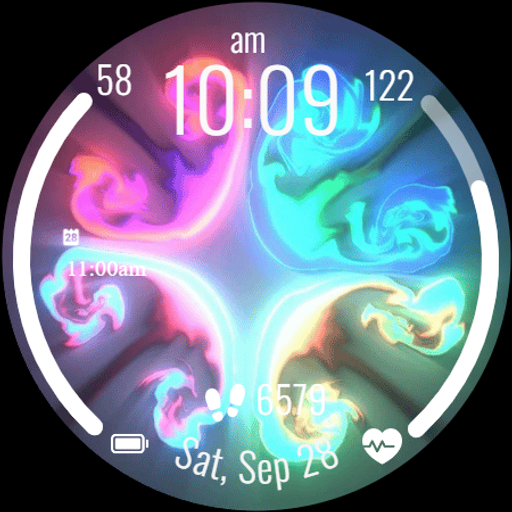
Bring your smartwatch to life with the Magic Fluids Watch Face! Enjoy stunning fluid motion graphics, transforming your watch into a work of art. Choose from a variety of dynamic background themes to suit your mood.
Experience mesmerizing fluid art on your wrist with vibrant watch faces. Customizable, dynamic themes and essential health data at a glance.
Magic Fluid Wallpaper App delivers dynamic, fluid art to your screen. Experience stunning visuals with flowing designs.
⚙️ Watch Face Features
• Background Themes
• Date, month and day of the week
• 12/24 Hour Time
• Heart Rate display
• Battery %
• Steps Counter
• Customizable Complications
• Ambient Mode
• Always-on Display (AOD)
• Long tap to customize
• 🎨 Magic Fluids Watch Face Customization
• Touch and hold display
• Tap on Customize option
• 🎨 Magic Fluids Watch Face Complications
• Touch and hold display to open customization mode. You can customize the field with any data you want.
• 🔋 Battery
• For better battery performance of the watch, we recommend disabling the "Always On Display" mode.
• 📱 Installation Guide
• After installing the Magic Fluids Watch Face, follow these steps:
1.Open the Companion App on your phone
2.Tap "Install on Watch"
3.On your watch, select the Magic Fluids Watch Face from your settings or watch face gallery
• ✅ Compatibility
• Compatible with all Wear OS devices API 33+ including Google Pixel Watch, Samsung Galaxy Watch, and more.
• Not suitable for rectangular watches.
Note: The Magic Fluid designs are displayed as wallpapers on the watch face screen. The fluid motion is visual only — a vibrant, flowing look without interactive touch functionality.
Thank you!
Magic Fluid Wallpaper App delivers dynamic, fluid art to your screen. Experience stunning visuals with flowing designs.
⚙️ Watch Face Features
• Background Themes
• Date, month and day of the week
• 12/24 Hour Time
• Heart Rate display
• Battery %
• Steps Counter
• Customizable Complications
• Ambient Mode
• Always-on Display (AOD)
• Long tap to customize
• 🎨 Magic Fluids Watch Face Customization
• Touch and hold display
• Tap on Customize option
• 🎨 Magic Fluids Watch Face Complications
• Touch and hold display to open customization mode. You can customize the field with any data you want.
• 🔋 Battery
• For better battery performance of the watch, we recommend disabling the "Always On Display" mode.
• 📱 Installation Guide
• After installing the Magic Fluids Watch Face, follow these steps:
1.Open the Companion App on your phone
2.Tap "Install on Watch"
3.On your watch, select the Magic Fluids Watch Face from your settings or watch face gallery
• ✅ Compatibility
• Compatible with all Wear OS devices API 33+ including Google Pixel Watch, Samsung Galaxy Watch, and more.
• Not suitable for rectangular watches.
Note: The Magic Fluid designs are displayed as wallpapers on the watch face screen. The fluid motion is visual only — a vibrant, flowing look without interactive touch functionality.
Thank you!
Rate the App
Add Comment & Review
User Reviews
Based on 0 reviews
No reviews added yet.
Comments will not be approved to be posted if they are SPAM, abusive, off-topic, use profanity, contain a personal attack, or promote hate of any kind.
More »

Popular Apps

Dawn of Zombies: Survival GameRoyal Ark

Network Data SubIsah

Tank Force: War games of BlitzXDEVS LTD

Grim Soul: Dark Survival RPGBrickworks Games Ltd

Kaspersky: VPN & AntivirusKaspersky ME

WhatsApp MessengerWhatsApp LLC

NordVPN – fast VPN for privacyNord Security

Kaspersky Fast Secure VPNKaspersky ME

Call of Duty Mobile Season 8Activision Publishing, Inc.

Vikings: War of ClansPlarium LLC
More »
Editor's Choice
Grim Soul: Dark Survival RPGBrickworks Games Ltd

Craft of Survival - Gladiators101XP LIMITED

Last Shelter: SurvivalLong Tech Network Limited
Dawn of Zombies: Survival GameRoyal Ark

Merge Survival : WastelandStickyHands Inc.

AoD Vikings: Valhalla GameRoboBot Studio

Viking Clan: RagnarokKano Games
Vikings: War of ClansPlarium LLC

Asphalt 9: LegendsGameloft SE

Modern Tanks: War Tank GamesXDEVS LTD