


Latest Version
Version
Latest
Latest
Update
June 21, 2026
June 21, 2026
Developer
Grubel
Grubel
Categories
Platforms
Android
Android
Downloads
0
0
License
$1.99
$1.99
Package Name
com.grbl.weather3
com.grbl.weather3
Report
Report a Problem
Report a Problem
More About GRBL Nothing Weather 3
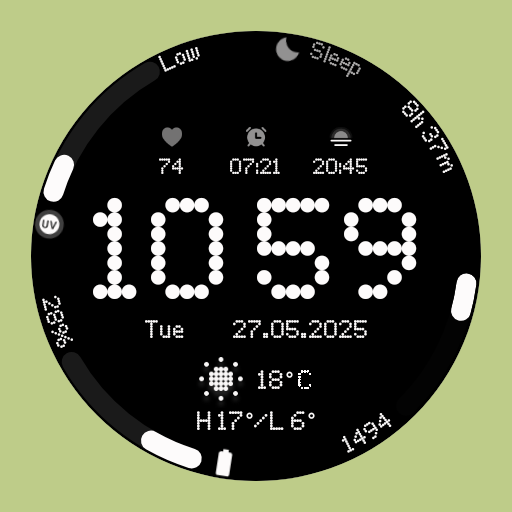
🌟 Next-Level Nothing OS Watch Face for Wear OS
Upgrade your Wear OS smartwatch with a stylish, modern watch face inspired by Nothing OS. Packed with custom complications, weather icons, and themes, it’s designed to give your watch both function and flair.
Why You’ll Love It:
✅ AM/PM & 12H/24H time formats
✅ 7 customizable complications (including progress bars & range values)
✅ 11 unique weather icons for instant forecasts
✅ Date display adapts automatically to your locale
✅ Always-On Display (AOD) with theme-matching colors
✅ 13 stunning themes to suit your style
Quick Tips for Weather Complications:
Update weather manually after installation if it doesn’t appear.
If still missing, switch to another watch face and back.
Fahrenheit users: initial temperatures may appear very high (e.g., 69°C) before syncing; it will update automatically.
Easy Installation:
From the Play Store app:
Select your watch from the drop-down menu and install.
Long press the watch screen → swipe left → tap ‘ADD WATCH FACE’ to activate.
From the Play Store website:
Open the watch face listing in a PC/Mac browser.
Click “Install on more devices” → select your watch.
Long press the watch screen → swipe left → tap ‘ADD WATCH FACE’ to activate.
📹 Samsung Developers video with installation tips: Watch Here
Important Notes:
The companion app opens the Play Store listing only; it does not install the watch face automatically.
For phone battery status on your watch, install the Phone Battery Complication app.
Custom complications vary by device and third-party apps. Screenshots show examples using the Phone Battery Complication app.
Need Help?
Email us at grubel.watchfaces@gmail.com
. We provide step-by-step instructions and screenshots to make setup easy.
Upgrade your Wear OS smartwatch with a stylish, modern watch face inspired by Nothing OS. Packed with custom complications, weather icons, and themes, it’s designed to give your watch both function and flair.
Why You’ll Love It:
✅ AM/PM & 12H/24H time formats
✅ 7 customizable complications (including progress bars & range values)
✅ 11 unique weather icons for instant forecasts
✅ Date display adapts automatically to your locale
✅ Always-On Display (AOD) with theme-matching colors
✅ 13 stunning themes to suit your style
Quick Tips for Weather Complications:
Update weather manually after installation if it doesn’t appear.
If still missing, switch to another watch face and back.
Fahrenheit users: initial temperatures may appear very high (e.g., 69°C) before syncing; it will update automatically.
Easy Installation:
From the Play Store app:
Select your watch from the drop-down menu and install.
Long press the watch screen → swipe left → tap ‘ADD WATCH FACE’ to activate.
From the Play Store website:
Open the watch face listing in a PC/Mac browser.
Click “Install on more devices” → select your watch.
Long press the watch screen → swipe left → tap ‘ADD WATCH FACE’ to activate.
📹 Samsung Developers video with installation tips: Watch Here
Important Notes:
The companion app opens the Play Store listing only; it does not install the watch face automatically.
For phone battery status on your watch, install the Phone Battery Complication app.
Custom complications vary by device and third-party apps. Screenshots show examples using the Phone Battery Complication app.
Need Help?
Email us at grubel.watchfaces@gmail.com
. We provide step-by-step instructions and screenshots to make setup easy.
Rate the App
Add Comment & Review
User Reviews
Based on 0 reviews
No reviews added yet.
Comments will not be approved to be posted if they are SPAM, abusive, off-topic, use profanity, contain a personal attack, or promote hate of any kind.
More »

Popular Apps

Dawn of Zombies: Survival GameRoyal Ark

Network Data SubIsah

Tank Force: War games of BlitzXDEVS LTD

Grim Soul: Dark Survival RPGBrickworks Games Ltd

Kaspersky: VPN & AntivirusKaspersky ME

WhatsApp MessengerWhatsApp LLC

NordVPN – fast VPN for privacyNord Security

Kaspersky Fast Secure VPNKaspersky ME

Vikings: War of ClansPlarium LLC

Call of Duty Mobile Season 8Activision Publishing, Inc.
More »
Editor's Choice
Grim Soul: Dark Survival RPGBrickworks Games Ltd

Craft of Survival - Gladiators101XP LIMITED

Last Shelter: SurvivalLong Tech Network Limited
Dawn of Zombies: Survival GameRoyal Ark

Merge Survival : WastelandStickyHands Inc.

AoD Vikings: Valhalla GameRoboBot Studio

Viking Clan: RagnarokKano Games
Vikings: War of ClansPlarium LLC

Asphalt 9: LegendsGameloft SE

Modern Tanks: War Tank GamesXDEVS LTD