


Latest Version
Version
Latest
Latest
Update
June 22, 2026
June 22, 2026
Developer
OQ Watchfaces
OQ Watchfaces
Categories
Platforms
Android
Android
Downloads
0
0
License
$0.99
$0.99
Package Name
com.watchfacestudio.fw2b
com.watchfacestudio.fw2b
Report
Report a Problem
Report a Problem
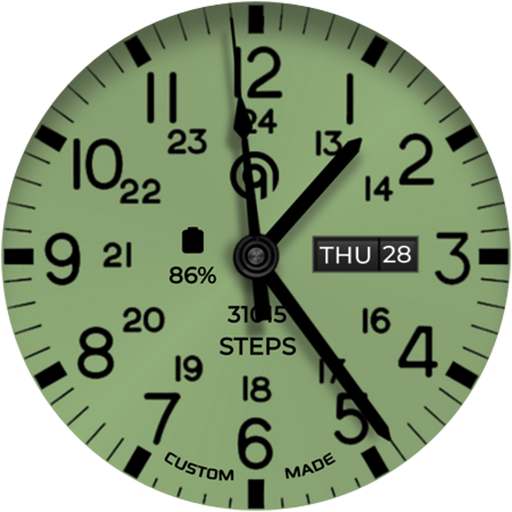
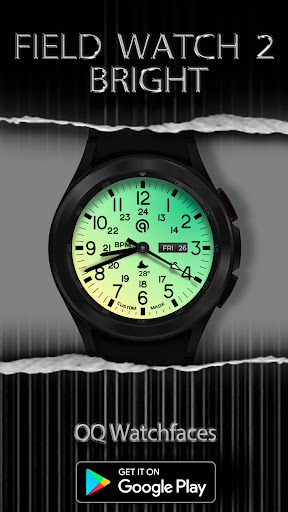
More About Field Watch 2 Bright WearOS 5+
This watch face for Wear OS 5 + Devices
contains a lot of options in customization menu.If for some reason it takes time to load customization options in Wearable app wait for at least 8 secs to 10 secs to let it load up all customization menu options while opening on Galaxy wearable app.
=======================================================
FEATURES AND FUNCTIONS
=======================================================
This watch face for WEAR OS has following features:-
1. Tap on 6 o clock hour number to open watch Google Maps app.
2. Tap on 12 o clock hour number to open watch Google Play Store App.
3. Tap on 10 o clock hour number to open watch Battery app.
4. Tap on Date or Day Text to open watch Calendar app.
5. Tap on 2 o clock hour number to open watch Alarm app.
6. Tap on 4 o clock hour number to open watch settings app.
7. 3 x different logos are available via customization menu.
8. Backgrounds:-
a. First 4 x Background styles including default follow the default coloring 30 x
styles option colored backgrounds. The first four are backgrounds with
various depth and shadows. so you can mix and match the way you like.
b. last 6 xBackground Styles are gradient colored The AoD will still follow the
30 color styles but background doesnot & Background style remains a
gradient background.
c. AoD Background:- Is fixed to pure black Amoled Background. and is not
affected by above selections.
9. Hour & Minutes Hands Color for Main Display can be switched off from customization Menu to make them full black.
10. Shadow option on/off is available in customization menu. Tip: use shadow mode on brighter backgrounds available produces nice results.
contains a lot of options in customization menu.If for some reason it takes time to load customization options in Wearable app wait for at least 8 secs to 10 secs to let it load up all customization menu options while opening on Galaxy wearable app.
=======================================================
FEATURES AND FUNCTIONS
=======================================================
This watch face for WEAR OS has following features:-
1. Tap on 6 o clock hour number to open watch Google Maps app.
2. Tap on 12 o clock hour number to open watch Google Play Store App.
3. Tap on 10 o clock hour number to open watch Battery app.
4. Tap on Date or Day Text to open watch Calendar app.
5. Tap on 2 o clock hour number to open watch Alarm app.
6. Tap on 4 o clock hour number to open watch settings app.
7. 3 x different logos are available via customization menu.
8. Backgrounds:-
a. First 4 x Background styles including default follow the default coloring 30 x
styles option colored backgrounds. The first four are backgrounds with
various depth and shadows. so you can mix and match the way you like.
b. last 6 xBackground Styles are gradient colored The AoD will still follow the
30 color styles but background doesnot & Background style remains a
gradient background.
c. AoD Background:- Is fixed to pure black Amoled Background. and is not
affected by above selections.
9. Hour & Minutes Hands Color for Main Display can be switched off from customization Menu to make them full black.
10. Shadow option on/off is available in customization menu. Tip: use shadow mode on brighter backgrounds available produces nice results.
Rate the App
Add Comment & Review
User Reviews
Based on 0 reviews
No reviews added yet.
Comments will not be approved to be posted if they are SPAM, abusive, off-topic, use profanity, contain a personal attack, or promote hate of any kind.
More »

Popular Apps

Dawn of Zombies: Survival GameRoyal Ark

Network Data SubIsah

Tank Force: War games of BlitzXDEVS LTD

Grim Soul: Dark Survival RPGBrickworks Games Ltd

WhatsApp MessengerWhatsApp LLC

Kaspersky: VPN & AntivirusKaspersky ME

NordVPN – fast VPN for privacyNord Security

Kaspersky Fast Secure VPNKaspersky ME

Vikings: War of ClansPlarium LLC
Turbo VPN - Secure VPN ProxyInnovative Connecting
More »
Editor's Choice
Grim Soul: Dark Survival RPGBrickworks Games Ltd

Craft of Survival - Gladiators101XP LIMITED

Last Shelter: SurvivalLong Tech Network Limited
Dawn of Zombies: Survival GameRoyal Ark

Merge Survival : WastelandStickyHands Inc.

AoD Vikings: Valhalla GameRoboBot Studio

Viking Clan: RagnarokKano Games
Vikings: War of ClansPlarium LLC

Asphalt 9: LegendsGameloft SE

Modern Tanks: War Tank GamesXDEVS LTD