


Latest Version
Version
Latest
Latest
Update
June 23, 2026
June 23, 2026
Developer
OQ Watchfaces
OQ Watchfaces
Categories
Platforms
Android
Android
Downloads
0
0
License
$1.49
$1.49
Package Name
com.watchfacestudio.fw
com.watchfacestudio.fw
Report
Report a Problem
Report a Problem
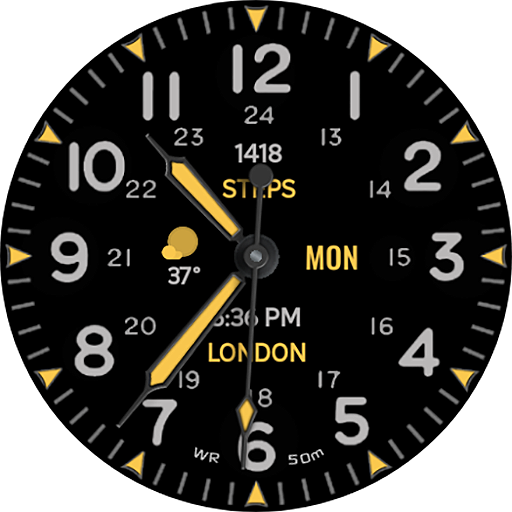
More About Field Watch 1 Wear OS 5+
======================================================
FEATURES AND FUNCTIONS
======================================================
Guide:-
1. Complications Slots:-
This watch face works with Wear OS Toolset Data Builder Component App very well.Maximize your complication slots. Use the Data Builder in Wear OS Tool set to stack multiple data points into a single space on this watch face ,Create custom own text complications components.
link
https://play.google.com/store/apps/details?id=com.gs.complications.suite
2. Installation Methods
Use this link if you don't know how to install or having problems in Installation. Copy it and read official Install Guide Showing 3 x methods that work 100 percent to install the watch face properly.
Link
https://developer.samsung.com/sdp/blog/en-us/2022/11/15/install-watch-faces-for-galaxy-watch5-and-one-ui-watch-45
This watch face for WEAR OS 5+ devices has following features:-
1. Tap on 12 o clock hour number to open watch Google Play Store App.
2. Tap on 6 o clock hour number bar to open watch Google Maps app.
3. Tap on 3 o clock hour number to open watch dial app.
4. Tap on 9 o clock hour number to open watch messages app.
5. Tap on 8 o clock hour number to open watch settings app.
6. Tap on Date Text to open watch Calendar app.
7. Tap at 2 O Clock to open watch Alarm app.
8. Tap at 10 O Clock to open watch Battery Settings.
9. 5 x invisible Complication shortcuts and 3 x Short text Complication on main are available customizable via customization menu which you can set for any other shortcuts you want.
10. Dim Mode is available for Main and Always on Display as well separately in customization menu.
======================================================
Guide:-
1. Complications Slots:-
This watch face works with Wear OS Toolset Data Builder Component App very well.Maximize your complication slots. Use the Data Builder in Wear OS Tool set to stack multiple data points into a single space on this watch face ,Create custom own text complications components.
link
https://play.google.com/store/apps/details?id=com.gs.complications.suite
2. Installation Methods
Use this link if you don't know how to install or having problems in Installation. Copy it and read official Install Guide Showing 3 x methods that work 100 percent to install the watch face properly.
Link
https://developer.samsung.com/sdp/blog/en-us/2022/11/15/install-watch-faces-for-galaxy-watch5-and-one-ui-watch-45
This watch face for WEAR OS 5+ devices has following features:-
1. Tap on 12 o clock hour number to open watch Google Play Store App.
2. Tap on 6 o clock hour number bar to open watch Google Maps app.
3. Tap on 3 o clock hour number to open watch dial app.
4. Tap on 9 o clock hour number to open watch messages app.
5. Tap on 8 o clock hour number to open watch settings app.
6. Tap on Date Text to open watch Calendar app.
7. Tap at 2 O Clock to open watch Alarm app.
8. Tap at 10 O Clock to open watch Battery Settings.
9. 5 x invisible Complication shortcuts and 3 x Short text Complication on main are available customizable via customization menu which you can set for any other shortcuts you want.
10. Dim Mode is available for Main and Always on Display as well separately in customization menu.
Rate the App
Add Comment & Review
User Reviews
Based on 0 reviews
No reviews added yet.
Comments will not be approved to be posted if they are SPAM, abusive, off-topic, use profanity, contain a personal attack, or promote hate of any kind.
More »

Popular Apps

Dawn of Zombies: Survival GameRoyal Ark

Network Data SubIsah

Tank Force: War games of BlitzXDEVS LTD

Grim Soul: Dark Survival RPGBrickworks Games Ltd

WhatsApp MessengerWhatsApp LLC

Kaspersky: VPN & AntivirusKaspersky ME

NordVPN – fast VPN for privacyNord Security

Kaspersky Fast Secure VPNKaspersky ME

Vikings: War of ClansPlarium LLC

Turbo VPN - Secure VPN ProxyInnovative Connecting
More »
Editor's Choice
Grim Soul: Dark Survival RPGBrickworks Games Ltd

Craft of Survival - Gladiators101XP LIMITED

Last Shelter: SurvivalLong Tech Network Limited
Dawn of Zombies: Survival GameRoyal Ark

Merge Survival : WastelandStickyHands Inc.

AoD Vikings: Valhalla GameRoboBot Studio

Viking Clan: RagnarokKano Games
Vikings: War of ClansPlarium LLC

Asphalt 9: LegendsGameloft SE

Modern Tanks: War Tank GamesXDEVS LTD