


Latest Version
Version
Latest
Latest
Update
June 18, 2026
June 18, 2026
Developer
OQ Watchfaces
OQ Watchfaces
Categories
Platforms
Android
Android
Downloads
0
0
License
Free
Free
Package Name
com.watchfacestudio.diver5dark
com.watchfacestudio.diver5dark
Report
Report a Problem
Report a Problem
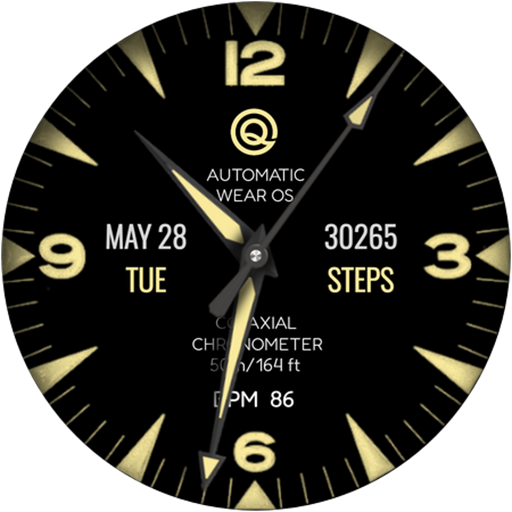
More About Diver 5 Black For Wear OS 5+
=======================================================
NOTICE: READ THIS ALWAYS BEFORE AND AFTER DOWNLOADING OUR WATCH FACE TO AVOID ANY SITUATION YOU DON'T LIKE.
=======================================================
This watch face for WEAR OS has been made in latest released Samsung Galaxy Watch face studio V 1.9.5 which is still evolving and has been tested on Samsung Watch 8 Classic , Samsung Watch 5 Pro, and Samsung watch Ultra. It also supports all other wear OS 5+ devices. Some feature experience can be slightly different on other watches.
a. Visit this link to official Install Guide written by Tony Morelan. (Sr. Developer, Evangelist)For Wear OS Watch faces powered by Samsung Watch face Studio. It is very detailed and precise with graphical and image illustrations on How to install the watch face bundle part to your connected wear os watch.
b. An effort also has been made to make a brief install guide as well (an image added with screen previews) .It is the last image in previews of this watch face for newbie android Wear OS users or those who do not know how to install the watch face to your connected device. So it is requested to also make an effort and read it before posting cannot install statements.
This watch face for WEAR OS 5+ has following features:-
1. Tap on text below OQ logo and it will open watch settings menu.
2. Tap on text information just above BPM text to open watch battery settings menu.
3. Tap on BPM text and it will open Heart Rate counter on watch.
4. Tap at 6 o clock and it will open watch phone app.
5. Tap at 12 o clock and it will open watch messaging app.
6. Dim Mode is available for Main and AoD separately in Customization menu.
=======================================================
This watch face for WEAR OS has been made in latest released Samsung Galaxy Watch face studio V 1.9.5 which is still evolving and has been tested on Samsung Watch 8 Classic , Samsung Watch 5 Pro, and Samsung watch Ultra. It also supports all other wear OS 5+ devices. Some feature experience can be slightly different on other watches.
a. Visit this link to official Install Guide written by Tony Morelan. (Sr. Developer, Evangelist)For Wear OS Watch faces powered by Samsung Watch face Studio. It is very detailed and precise with graphical and image illustrations on How to install the watch face bundle part to your connected wear os watch.
b. An effort also has been made to make a brief install guide as well (an image added with screen previews) .It is the last image in previews of this watch face for newbie android Wear OS users or those who do not know how to install the watch face to your connected device. So it is requested to also make an effort and read it before posting cannot install statements.
This watch face for WEAR OS 5+ has following features:-
1. Tap on text below OQ logo and it will open watch settings menu.
2. Tap on text information just above BPM text to open watch battery settings menu.
3. Tap on BPM text and it will open Heart Rate counter on watch.
4. Tap at 6 o clock and it will open watch phone app.
5. Tap at 12 o clock and it will open watch messaging app.
6. Dim Mode is available for Main and AoD separately in Customization menu.
Rate the App
Add Comment & Review
User Reviews
Based on 0 reviews
No reviews added yet.
Comments will not be approved to be posted if they are SPAM, abusive, off-topic, use profanity, contain a personal attack, or promote hate of any kind.
More »

Popular Apps

Dawn of Zombies: Survival GameRoyal Ark

Network Data SubIsah

Tank Force: War games of BlitzXDEVS LTD

Grim Soul: Dark Survival RPGBrickworks Games Ltd

Kaspersky: VPN & AntivirusKaspersky ME

WhatsApp MessengerWhatsApp LLC

NordVPN – fast VPN for privacyNord Security

Kaspersky Fast Secure VPNKaspersky ME

Call of Duty Mobile Season 8Activision Publishing, Inc.

Vikings: War of ClansPlarium LLC
More »
Editor's Choice
Grim Soul: Dark Survival RPGBrickworks Games Ltd

Craft of Survival - Gladiators101XP LIMITED

Last Shelter: SurvivalLong Tech Network Limited
Dawn of Zombies: Survival GameRoyal Ark

Merge Survival : WastelandStickyHands Inc.

AoD Vikings: Valhalla GameRoboBot Studio

Viking Clan: RagnarokKano Games
Vikings: War of ClansPlarium LLC

Asphalt 9: LegendsGameloft SE

Modern Tanks: War Tank GamesXDEVS LTD