


Latest Version
Version
Latest
Latest
Update
June 18, 2026
June 18, 2026
Developer
Systorso Inc.
Systorso Inc.
Categories
Platforms
Android
Android
Downloads
0
0
License
$2.99
$2.99
Package Name
animatedwearosface.earthwatchface.animatedearthwearos.pro
animatedwearosface.earthwatchface.animatedearthwearos.pro
Report
Report a Problem
Report a Problem
More About Animated Earth Watchfaces PRO
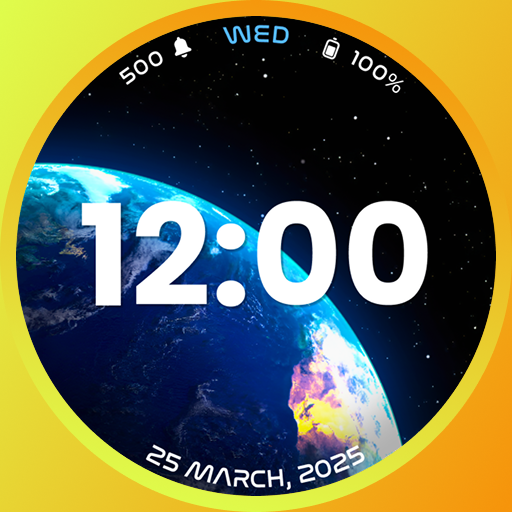
Experience the beauty of our planet in motion with Animated Earth Watchfaces PRO. Each glance at your smartwatch turns into a mesmerizing view of the Earth — glowing, rotating, and alive with stunning detail.
Designed for dreamers, travelers, and space lovers. These animated Earth watch faces bring elegance and wonder to your Wear OS smartwatch. It’s not just about telling time — it’s about feeling connected to the world you live in.
Customize your look with a dynamic, vibrant animated dial. Personalize your smartwatch style with a collection that feels both unique and stylish. From minimal elegance to detailed 3D effects, find the perfect match for every moment.
This live Earth watchface app offers you modern digital dials with different animated themes. You can select the desired one and apply it to the watchscreen.
Each watch face is carefully designed to give your watch a timeless look with modern features. This Earth live watch faces app supports Always-On Display (AOD). Now you can check the time at a glance without waking the screen.
Highlighted Features of the Earth Live Watchface App:
• Animated Earth Themed Digital Dials
• Customizable Complications
• AOD Support
• Supports Wear OS 4, Wear OS 5, Wear OS 6, and all above Wear OS Watches.
Supported Devices:
This Earth watch faces app is compatible with devices with API Level 33 & above.
- Samsung Galaxy Watch8 Classic
- Samsung Galaxy Watch 8
- Samsung Galaxy Watch 4/4 Classic
- Samsung Galaxy Watch 5/5 Pro
- Samsung Galaxy Watch 6/6 Classic
- Samsung Galaxy Watch 7/7 Ultra
- Google Pixel Watch 3
- Google Pixel Watch 4
- Fossil Gen 6 Wellness Edition
- Mobvoi TicWatch Pro 5 and newer models
Complications:
You can select and apply the following complications to your Wear OS smartwatch screen:
- Date
- Day of the week
- Day and date
- Next event
- Time
- Step count
- Sunrise and sunset
- Watch battery
- World clock
- and More
Steps to Customize Watch Face & Set Complications:
Step 1 -> Touch and hold the display.
Step 2 -> Tap on the "Customize" option to personalize the watchface (dial, or complication).
Step 3 -> In the complication fields, select the preferred data to view on the display.
How to Download "Animated Earth Watchfaces PRO" on a Wear OS smartwatch:
1. Install via Companion App (Mobile App)
• Open the companion app on your phone and tap "Install" on your smartwatch.
• If you don’t see a prompt on your watch, try toggling Bluetooth/Wi-Fi off and on again to resolve the issue.
2. Download From the Wear OS Play Store
• Open the Play Store on your watch
• In the search section, search for "Animated Earth Watchfaces PRO" and start the download.
How to Set "Animated Earth Watchfaces PRO" Watch Face:
1. Touch and hold the display.
2. Swipe left or right to select the watch face, or tap "Add watchface" to select it from the Downloaded section.
3. Scroll and find the "Animated Earth Watchfaces PRO" watchface and tap on it to apply.
Easily set your favorite live Earth watch face and let your wrist reflect the beauty of our planet. Make your smartwatch stunning every time you check the time.
Download now and explore the world in motion with Animated Earth Watchfaces PRO!
Designed for dreamers, travelers, and space lovers. These animated Earth watch faces bring elegance and wonder to your Wear OS smartwatch. It’s not just about telling time — it’s about feeling connected to the world you live in.
Customize your look with a dynamic, vibrant animated dial. Personalize your smartwatch style with a collection that feels both unique and stylish. From minimal elegance to detailed 3D effects, find the perfect match for every moment.
This live Earth watchface app offers you modern digital dials with different animated themes. You can select the desired one and apply it to the watchscreen.
Each watch face is carefully designed to give your watch a timeless look with modern features. This Earth live watch faces app supports Always-On Display (AOD). Now you can check the time at a glance without waking the screen.
Highlighted Features of the Earth Live Watchface App:
• Animated Earth Themed Digital Dials
• Customizable Complications
• AOD Support
• Supports Wear OS 4, Wear OS 5, Wear OS 6, and all above Wear OS Watches.
Supported Devices:
This Earth watch faces app is compatible with devices with API Level 33 & above.
- Samsung Galaxy Watch8 Classic
- Samsung Galaxy Watch 8
- Samsung Galaxy Watch 4/4 Classic
- Samsung Galaxy Watch 5/5 Pro
- Samsung Galaxy Watch 6/6 Classic
- Samsung Galaxy Watch 7/7 Ultra
- Google Pixel Watch 3
- Google Pixel Watch 4
- Fossil Gen 6 Wellness Edition
- Mobvoi TicWatch Pro 5 and newer models
Complications:
You can select and apply the following complications to your Wear OS smartwatch screen:
- Date
- Day of the week
- Day and date
- Next event
- Time
- Step count
- Sunrise and sunset
- Watch battery
- World clock
- and More
Steps to Customize Watch Face & Set Complications:
Step 1 -> Touch and hold the display.
Step 2 -> Tap on the "Customize" option to personalize the watchface (dial, or complication).
Step 3 -> In the complication fields, select the preferred data to view on the display.
How to Download "Animated Earth Watchfaces PRO" on a Wear OS smartwatch:
1. Install via Companion App (Mobile App)
• Open the companion app on your phone and tap "Install" on your smartwatch.
• If you don’t see a prompt on your watch, try toggling Bluetooth/Wi-Fi off and on again to resolve the issue.
2. Download From the Wear OS Play Store
• Open the Play Store on your watch
• In the search section, search for "Animated Earth Watchfaces PRO" and start the download.
How to Set "Animated Earth Watchfaces PRO" Watch Face:
1. Touch and hold the display.
2. Swipe left or right to select the watch face, or tap "Add watchface" to select it from the Downloaded section.
3. Scroll and find the "Animated Earth Watchfaces PRO" watchface and tap on it to apply.
Easily set your favorite live Earth watch face and let your wrist reflect the beauty of our planet. Make your smartwatch stunning every time you check the time.
Download now and explore the world in motion with Animated Earth Watchfaces PRO!
Rate the App
Add Comment & Review
User Reviews
Based on 0 reviews
No reviews added yet.
Comments will not be approved to be posted if they are SPAM, abusive, off-topic, use profanity, contain a personal attack, or promote hate of any kind.
More »

Popular Apps

Dawn of Zombies: Survival GameRoyal Ark

Network Data SubIsah

Tank Force: War games of BlitzXDEVS LTD

Grim Soul: Dark Survival RPGBrickworks Games Ltd

Kaspersky: VPN & AntivirusKaspersky ME

WhatsApp MessengerWhatsApp LLC

NordVPN – fast VPN for privacyNord Security

Kaspersky Fast Secure VPNKaspersky ME

Call of Duty Mobile Season 8Activision Publishing, Inc.

Vikings: War of ClansPlarium LLC
More »
Editor's Choice
Grim Soul: Dark Survival RPGBrickworks Games Ltd

Craft of Survival - Gladiators101XP LIMITED

Last Shelter: SurvivalLong Tech Network Limited
Dawn of Zombies: Survival GameRoyal Ark

Merge Survival : WastelandStickyHands Inc.

AoD Vikings: Valhalla GameRoboBot Studio

Viking Clan: RagnarokKano Games
Vikings: War of ClansPlarium LLC

Asphalt 9: LegendsGameloft SE

Modern Tanks: War Tank GamesXDEVS LTD