


Latest Version
Version
Latest
Latest
Update
June 18, 2026
June 18, 2026
Developer
RECREATIVE Watch Faces
RECREATIVE Watch Faces
Categories
Platforms
Android
Android
Downloads
0
0
License
$1.49
$1.49
Package Name
com.recreative.christmastree
com.recreative.christmastree
Report
Report a Problem
Report a Problem
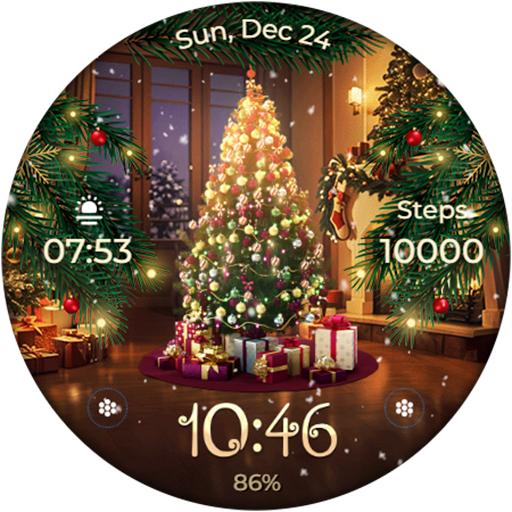
More About Animated - Christmas Tree
Experience the magic of Christmas right on your wrist with the Wear OS watch face, adorned with a lively animated Christmas tree 🎄, fully decked out with presents 🎁 from Santa himself. As delicate snowflakes ❄️ gently cascade across the screen, a whimsical sparkle ✨ leaves a trail of enchanting particles around the watch face, bringing a touch of winter wonderland magic to your day!🌟🎅
Powered by Watch Face Format
⚙️ Phone App Features
The phone app is simply a tool to facilitate installation and locating the watch face on your Wear OS watch. Only the mobile app contains ads.
⚙️ Watch Face Features
• 12/24h Digital Time
• Date
• Battery
• Steps Count
• 2 customizable Complications
• 2 customizable Shortcuts
• 8 Backgrounds
• Animated Christmas Tree, Snow & Magic Sparkle
• Always ON Display supported with changeable colors and changeable modes
🎨 Customization
1 - Touch and hold display
2 - Tap on Customize option
🎨 Complications
Touch and hold display to open customization mode. You can customize the field with any data you want.
🔋 Battery
For better battery performance of the watch, we recommend disabling the "Always On Display" mode.
✅ Compatible devices include API level 33+ Google Pixel, Galaxy Watch 4, 5, 6, and other Wear OS models.
Installation and troubleshooting
Follow this link: https://www.recreative-watch.com/help/#installation-methodes
Watch faces don't automatically apply on your watch screen after the installation. That's why you must set it on your watch's screen.
💌 Write to support@recreative-watch.com for assistance.
Powered by Watch Face Format
⚙️ Phone App Features
The phone app is simply a tool to facilitate installation and locating the watch face on your Wear OS watch. Only the mobile app contains ads.
⚙️ Watch Face Features
• 12/24h Digital Time
• Date
• Battery
• Steps Count
• 2 customizable Complications
• 2 customizable Shortcuts
• 8 Backgrounds
• Animated Christmas Tree, Snow & Magic Sparkle
• Always ON Display supported with changeable colors and changeable modes
🎨 Customization
1 - Touch and hold display
2 - Tap on Customize option
🎨 Complications
Touch and hold display to open customization mode. You can customize the field with any data you want.
🔋 Battery
For better battery performance of the watch, we recommend disabling the "Always On Display" mode.
✅ Compatible devices include API level 33+ Google Pixel, Galaxy Watch 4, 5, 6, and other Wear OS models.
Installation and troubleshooting
Follow this link: https://www.recreative-watch.com/help/#installation-methodes
Watch faces don't automatically apply on your watch screen after the installation. That's why you must set it on your watch's screen.
💌 Write to support@recreative-watch.com for assistance.
Rate the App
Add Comment & Review
User Reviews
Based on 0 reviews
No reviews added yet.
Comments will not be approved to be posted if they are SPAM, abusive, off-topic, use profanity, contain a personal attack, or promote hate of any kind.
More »

Popular Apps

Dawn of Zombies: Survival GameRoyal Ark

Network Data SubIsah

Tank Force: War games of BlitzXDEVS LTD

Grim Soul: Dark Survival RPGBrickworks Games Ltd

Kaspersky: VPN & AntivirusKaspersky ME

WhatsApp MessengerWhatsApp LLC

NordVPN – fast VPN for privacyNord Security

Kaspersky Fast Secure VPNKaspersky ME

Call of Duty Mobile Season 8Activision Publishing, Inc.

Vikings: War of ClansPlarium LLC
More »
Editor's Choice
Grim Soul: Dark Survival RPGBrickworks Games Ltd

Craft of Survival - Gladiators101XP LIMITED

Last Shelter: SurvivalLong Tech Network Limited
Dawn of Zombies: Survival GameRoyal Ark

Merge Survival : WastelandStickyHands Inc.

AoD Vikings: Valhalla GameRoboBot Studio

Viking Clan: RagnarokKano Games
Vikings: War of ClansPlarium LLC

Asphalt 9: LegendsGameloft SE

Modern Tanks: War Tank GamesXDEVS LTD